React is a JavaScript “framework” that helps developers wrap together content, structure, and style. Using React, front-end web developers can bring in other JavaScript libraries old and new, import their functionality, and expect to obtain websites with moving and versatile units on screen.
At the base of all these moving assets, there is a concept called component “state.” Component state can consist of many defined variables, and represents variables that change as the interaction context changes. As the way the interface looks changes, developers use “state variables” to compute new looks to the screen. Inputs from the user drive the app’s state to move and change the way the app looks.
To developers out there modifying the state variable with authored programs there are “state rules” that one should follow:
The React “state variable” should only be accessed from within React class-based components.
File App.js
class App {
class App extends React.Component {
    constructor(props) {
        this.state = {vari : ''}
    }
    render() {
    ...
    }
}
App.js represents a class based component. React component state variables, such as “vari” should only be initialized from within a React class-based component.
2. Don’t confuse component state and “props”
Components in React also have properties that are assigned to them. When properties are added to a component instance, (like variable “someProp”) and those props are passed to other instances, props can act as parameters that “feed in” to add extra information to that new instance. But React Component “state” is a special variable, and should not be assigned a value the conventional way – by that I mean, in the way normal values are assigned via “variable = value”.
You should instead use the following two methods to assign state: via a constructor-like method, or via the special setState instance method given to every React asset. Here are two examples:
a) via some constructor like method.
(File App.js)
constructor ( ) { this.state = {myVar: null}
}
render() { … }
or
File(App.js)
constructor() {
}state = {myVar : null}
render() { … }
b) via the setState method.
File App.js
class App extends React.Component {
    myMethod() {
       this.setState({myVar : position.coords.latitude})
    }
}
3. Updating state causes the component to re-render
When the state is changed, the render() function can re-render the page with updated JavaScript properties. Conditionals that depend on the newly set state variables can be used as tools to return new JSX in various scenarios.
Combining all this together, we can come up with an example. This render statement displays information about the latitude of the user based on a value stored in a state variable.
render() {
    if(this.state.myVar) {
        return <div>Something got clicked!</div>
    }
    return (
        <div>
            <input type="button" value="Click" onClick={this.buttonWasClicked}/>
            <br/><img src={spinnerGif} />
            <br/>Please click the button
        </div>
    )
}
{spinnerGif} refers to an imported link to a spinner gif image, although it could be a different image too.
Here is a sample snapshot of how this page looks at first.
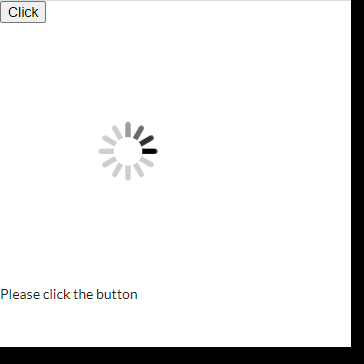
Having done nothing, we will see this image on the page. There is a variable in the if condition named “myVar”, and that will be the variable we use to change the look of the page. Here is the code that causes the change:
class App extends React.Component {
    constructor(props) {
        super(props);
        this.state = {myVar: null}
    }
    buttonWasClicked = (e) => {
        this.setState({myVar : true})
    }
render() {
...
}
When we click the button, we call buttonWasClicked, a function we define just below the constructor, that changes myVar to true. Since that variable is part of component state, having changed that variable, the change will quickly rerender the page. Upon re-render, we will enter the second if condition:
return <div>Something got clicked!</div>…and the page will change to look like this:

That completes our explanation of rules of Component State in React.js.
 Techno Nuance